Programming 2 coloured jacquards

Hi all,

A newbie here. I got my Kniterate 3 months ago and I love it! But there is a lot I have to learn. Maybe someone can help me with my question:

I do a lot of 2 colored jacquards lately.. but I think my technique of programming is so laborious..

First of all I load the image via Stitch Block and then I make a copy of every single front row and put it in the rear bed.

Is there maybe a trick or a hidden function how I can speed up programming?

Thank you all,

Anna
9 replies

  1. Ariadna PonsOfficial reply

    Hi @Anna M. ,

    thanks for reaching out.

    Can I ask, what format is the image you are loading?

    Have you tried the Birdseye jacquard command?

    Looking forward to hearing back from you!

    Kind regards,

    1 vote
  2. Hi Ariadna,

    the image I used was for example a png file (100x220pixel).

    The Birdseye command isn't useful for me in this case, because I want the fabric to be reversible.

    Kind regards,

    Anna

    1 vote
  3. Ariadna PonsOfficial reply

    Hi @Anna M. ,

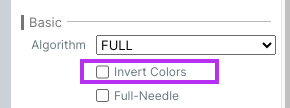
    you can use the option “Invert colors” in the Birdseye command to create a reversible 2 color Jacquard.

    1 vote
  4. Thank you so much, Ariadna!

    I knew there must be an easier way!

  5. Lila R.

    Hi there,

    I tried to use the option “birdeye jacquard” to program a 2 colour jacquard but the program is adding a 3rd colour even though the image I imported only has 2.

    Any suggestion why this is happening?

    Thanks for your help!

  6. Ariadna PonsOfficial reply

    Hi @Lila R. ,

    the program creates a birdseye backing by default, for which it needs a 3rd color. To keep it a 2-color reversible piece, click on “Invert colors” as shown above.

    Thanks!

  7. Lila R.

    Thanks Ariadna :)

    1 vote
  8. ruhiparveen

    Thanks to all

  9. Steven Y.

    hi

Add a reply

Sign in to reply. Your Kniterate account works here: the same e-mail and password as customist.com, or Google.